
Joining a Sub-Club
In order to sign up for Skills & Drills, Level Evaluation, you must first join the correct sub-club associated with your skill level. This feature is provided by the Pickleball Den software. You can also use this feature to join other sub-clubs that are not skill level based.
This page describes the process of joining a sub-club on Pickleball Den.
Instructions
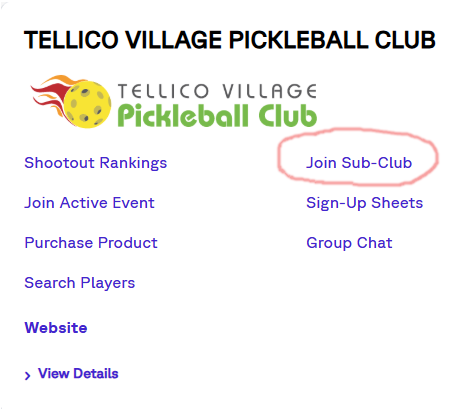
First go to the Pickleball Den website and log in. Look for the Tellico Village Pickleball Club, then select “Join Sub-Club”:
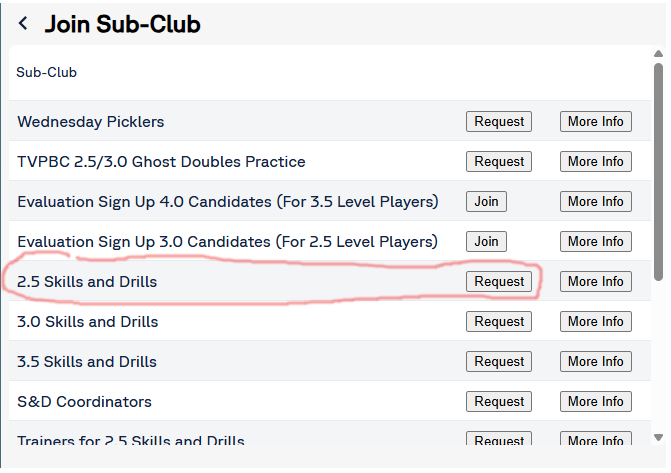
You will see a list of sub-clubs. Look for the one you are interested in, then click on Join or Request. IMPORTANT: You may have to scroll down to see the complete list of sub-clubs.
As an example, if you wish to join the sub-club for 2.5 skills in drills, click the Request button next to “2.5 Skills and Drills”:
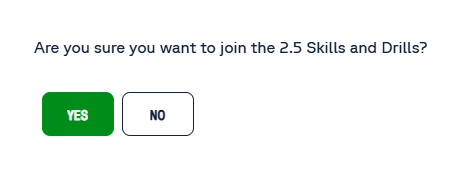
You will then be prompted to confirm your request:
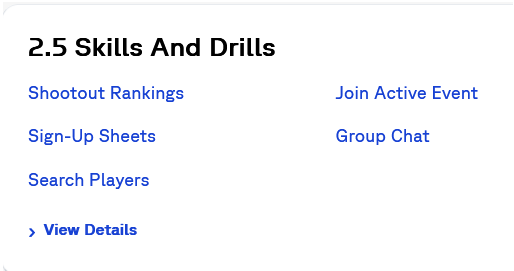
Once you confirm your request, it will be sent to the sub-club manager for approval. Once approved, you’ll see the sub-club listed on your Pickleball Den home screen in addition to the Tellico Village Pickleball Club:
The same process can be used for joining other sub-clubs such as evaluation sub-clubs.
Once you’ve joined a sub-club, you can find out more here on signing up for events such as skills and drills and evaluations.